マルチプロトコル産業用ゲートウェイ — デプロイガイド

プリセット

Multi-Protocol Data Hub

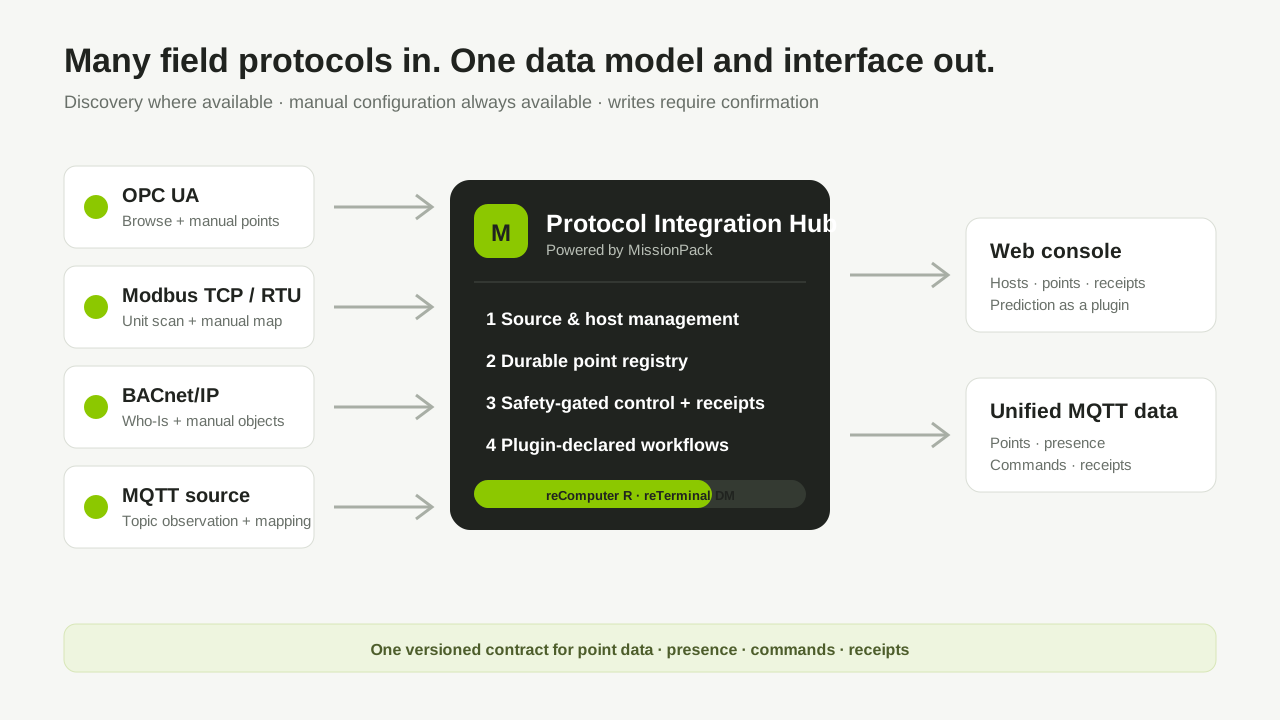
Bring OPC UA, Modbus, BACnet/IP and MQTT controllers into one point model, read and control them from one console, and expose data, commands and receipts over MQTT topics.

  • Devices: a host or reComputer R1000 / R1100 / reTerminal DM to run the service; industrial controllers providing OPC UA, Modbus, BACnet/IP or MQTT data.
  • Software: Docker Engine 20.10+, at least 4 GB free disk space.
  • Network: the host can reach the controller network and sensecraft-missionpack.seeed.cn.
1

Deploy the Multi-Protocol Data Hub

Start the protocol integration and data services.

デプロイ方法

Deploy on the machine running SenseCraft Solution. BACnet/IP broadcast discovery may not work on Docker Desktop; enter BACnet addresses manually, or use the remote target.

配線

Connection architecture

  1. Connect this machine to the controller network.
  2. Keep the default web (8280) and MQTT (1883) ports, or pick unused ports in the deployment form.
  3. The local target does not attach a serial device. For Modbus RTU use the serial-device deployment profile, and keep production writes disabled until hardware validation is complete.
入力が必要な項目(SenseCraft Solution アプリで入力)
  • Web Console Port*既定値 8280

    Host port used to open the multi-protocol data hub console

  • MQTT Service Port*既定値 1883

    Host port reserved for the optional embedded MQTT broker

  • Time Zone*既定値 Asia/Shanghai
トラブルシューティング
SymptomFix
Docker is not availableStart Docker Desktop or Docker Engine, then retry
Port 8280 or 1883 is busyChoose other ports in the deployment form
Image download failsConfirm the host can reach sensecraft-missionpack.seeed.cn and has at least 4 GB free
Health check stays pendingRun docker logs missionpack-industrial-gateway to see why
2

Configure Unified Access and Data Service

Open the web console, create an administrator, and connect the first controller.

  1. Create the first administrator account; no token is required.
  2. Open Access, click Add, choose OPC UA, Modbus, BACnet/IP, or MQTT, and configure the controller.
  3. Run discovery and confirm only the points you need; add points manually when discovery is unavailable or incomplete.
  4. Open Points and check live values and quality before granting write access.
前提条件

The service from Step 1 is healthy.

トラブルシューティング
SymptomFix
The page does not loadWait for Step 1 to report healthy, then check the web port
A discovered point is missingAdd the point manually and verify its protocol address
A control command is rejectedCheck point write permission, data quality, safety rules, and the command receipt
MQTT control is unavailableEnable TLS and configure a control identity; plaintext mode is telemetry-only
デプロイ後

Next steps

  • Open Data Service to configure the embedded MQTT broker and review point, presence, command, and receipt topics.
  • For prediction, open the prediction plugin to import CSV data and configure input/output points.
3

Publish Northbound and Verify Store-and-Forward — pending image build

Send gateway data to an external or cloud MQTT broker. During a broker outage data is buffered locally and replayed in order after reconnect. Skip this step if the embedded broker from Step 2 is the only consumer.

前提条件

The deployed image v1.6.7 does not include this feature, so this step cannot be completed yet. Every call below returns HTTP 404.

  • The administrator account from Step 2.
  • A reachable external MQTT broker and its CA certificate. TLS 1.2 or newer is required; plaintext is refused in production.
  • Configure and start through the management API: PUT /system/northbound-publish/config (broker address, topic prefix, buffer limits, TLS material), then POST /system/northbound-publish/start.
トラブルシューティング
SymptomFix
/system/northbound-publish/status returns 404The running image does not include this feature
Start fails with a transport errorSupply TLS material; plaintext is refused in production
Status reports running but not connectedCheck broker reachability, credentials, and that the CA certificate matches the broker certificate
queued_bytes grows and never drainsThe link is still down, or the buffer is full and old data is being dropped; check dropped and oldest_age_seconds
Messages are missing at the cloud after a broker restartUse a persistent broker and a durable subscriber session
デプロイ後

Quick verification — enabled once the image is published

  1. GET /system/northbound-publish/status reports running and connected.
  2. A cloud subscriber on <prefix>/{gateway}/telemetry receives messages with message_id, gateway_id, and samples.
  3. Stop the broker; northbound.spool.queued in /system/runtime-metrics grows.
  4. Restart the broker; northbound.spool.queued returns to 0 and dropped has not increased.
  5. The <prefix>/{gateway}/status topic is back to online.

Running the capacity soak

Clone the upstream repository onto the target device and run:

uv run python scripts/r14_capacity_soak.py --profile release \
  --evidence-root log/r14-capacity-evidence --run-id release-<UTC timestamp>

The release profile runs for 24 h; capacity-smoke runs for 180 s. A run passes when verdict.json reports passed=true.

Next steps

  1. Set the buffer limits from your longest expected outage.
  2. Deduplicate on message_id in the cloud consumer; replayed messages can repeat.
  3. Alert on northbound.spool.dropped and oldest_age_seconds.

Protocol Release Status

ProtocolCurrent boundary
OPC UASource configuration, browse/manual points, live reads, and controlled writes
Modbus TCPManual points, unit scan, live reads, and controlled writes
BACnet/IPWho-Is discovery, manual points, ReadProperty, and WriteProperty with priority and Null relinquish. COV subscription, BBMD/Foreign-Device registration, and MS-TP are not supported
MQTT sourceExplicit topic mappings and bounded topic observation
Modbus RTU/RS-485Requires the serial-device deployment profile and USB hardware validation
Northbound MQTT publishBatched telemetry, health and status, heartbeat, outage buffering and ordered replay. Not in v1.6.7
Northbound topic contractMissionPack v1 topics; Sparkplug B is not supported